
YugabyteDB extends the concept of PostgreSQL tablespaces for a distributed database. In PostgreSQL, tablespaces allow administrators to specify where on a disk specific tables and indexes should reside based on how users want to store and access the data. This control over data placement enables fine-grained performance tuning. You can, for example, place heavily accessed smaller tables and indexes in SSDs.

YSQL tablespaces re-purpose this concept for a geo-distributed deployment by allowing you to specify the number of replicas for a table or index, and how they can be distributed across a set of clouds, regions, and zones. Replicating and pinning tables in specific regions can lower read latency, improve resilience, and achieve compliance with data residency laws. For example, you can create duplicate indexes on the same column of a table and place these indexes close to users in different regions for fast access. Similarly, you can partition a master table and associate the partitions with different tablespaces to pin the data geographically.

The ability to control the placement of tables in a fine-grained manner provides the following advantages:

- Tables with critical information can have higher replication factor and increased fault tolerance compared to the rest of the data.
- Based on the access pattern, a table can be constrained to the region or zone where it's accessed most frequently.
- A table can have an index with an entirely different placement policy, thereby boosting the read performance without affecting the placement policy of the table itself.
- Coupled with table partitioning, tablespaces can be used to implement row-level geo-partitioning. This allows pinning the rows of a table in different geo-locations based on the values of certain columns in that row.

## Data placement and latency

In a distributed cloud-native database such as YugabyteDB, the location of tables and indexes plays an important role in achieving optimal performance for any workload. The following diagram illustrates the ping latencies amongst nodes in a geo-distributed cluster. Nodes closer to each other communicate with visibly lesser latency than nodes physically far away from each other.

![Cluster Ping Latencies](/images/explore/tablespaces/cluster_ping_latencies.png)

Given the impact of distance on node-to-node communication, it's beneficial to be able to specify at a table level, how its data should be spread across the cluster. This way, you can move tables closer to their clients and decide which tables actually need to be geo-distributed. Using tablespaces you can specify the number of replicas for a set of tables or indexes, and how each of these replicas should be distributed across a set of cloud, regions, and zones.

## Cluster setup

The example describes how to create the following:

- A cluster that is spread across multiple regions across the world.
- Tablespaces that specify single-zone, multi-zone, and multi-region placement policies.
- Tables associated with the created tablespaces.

In addition, the example demonstrates the effect of geo-distribution on basic YSQL commands by measuring the effect of various geo-distribution policies on the latencies observed while running `INSERT` and `SELECT` statements. The results can be seen in the following table:

| Geo-Distribution | INSERT Latency (ms) | SELECT Latency (ms) |
| :--------------- | :------------------ | :------------------ |
| Single Zone | 4.676 | 1.880 |
| Multi Zone | 11.825 | 4.145 |
| Multi Region | 836.616 | 337.154 |

The differences between a single-zone, multi-zone, and multi-region configuration becomes apparent when a cluster with the following topology is deployed. This topology is chosen for illustrative purposes as it can allow creation of node, zone, region fault-tolerant placement policies in the same cluster with minimum nodes.

| Region | Zone | Number of nodes |
| :----- | :--- | :-------------- |
| us-east-1 (N.Virginia) | us-east-1a | 3 |
| us-east-1 (N.Virginia) | us-east-1b | 1 |
| us-east-1 (N.Virginia) | us-east-1c | 1 |
| ap-south-1 (Mumbai) | ap-south-1a | 1 |
| eu-west-2 (London) | eu-west-2c | 1 |

The topology is shown in the following illustration:

![Overview Cluster Diagram](/images/explore/tablespaces/overview_cluster_diagram.png)

## Create the cluster

<ul class="nav nav-tabs nav-tabs-yb">
  <li >
    <a href="#yugabyted" class="nav-link active" id="yugabyted-tab" data-bs-toggle="tab" role="tab" aria-controls="yugabyted" aria-selected="true">
      <img src="/icons/database.svg" alt="Server Icon">
      Local
    </a>
  </li>
  <li>
    <a href="#platform" class="nav-link" id="platform-tab" data-bs-toggle="tab" role="tab" aria-controls="platform" aria-selected="false">
      <img src="/icons/server.svg" alt="Server Icon">
      YugabyteDB Anywhere
    </a>
  </li>
</ul>

<div class="tab-content">
  <div id="yugabyted" class="tab-pane fade show active" role="tabpanel" aria-labelledby="yugabyted-tab">
  {{% includeMarkdown "./tablespaces-yugabyted.md" %}}
  </div>
  <div id="platform" class="tab-pane fade" role="tabpanel" aria-labelledby="platform-tab">
  {{% includeMarkdown "./tablespaces-platform.md" %}}
  </div>
</div>

## Create a single-zone table

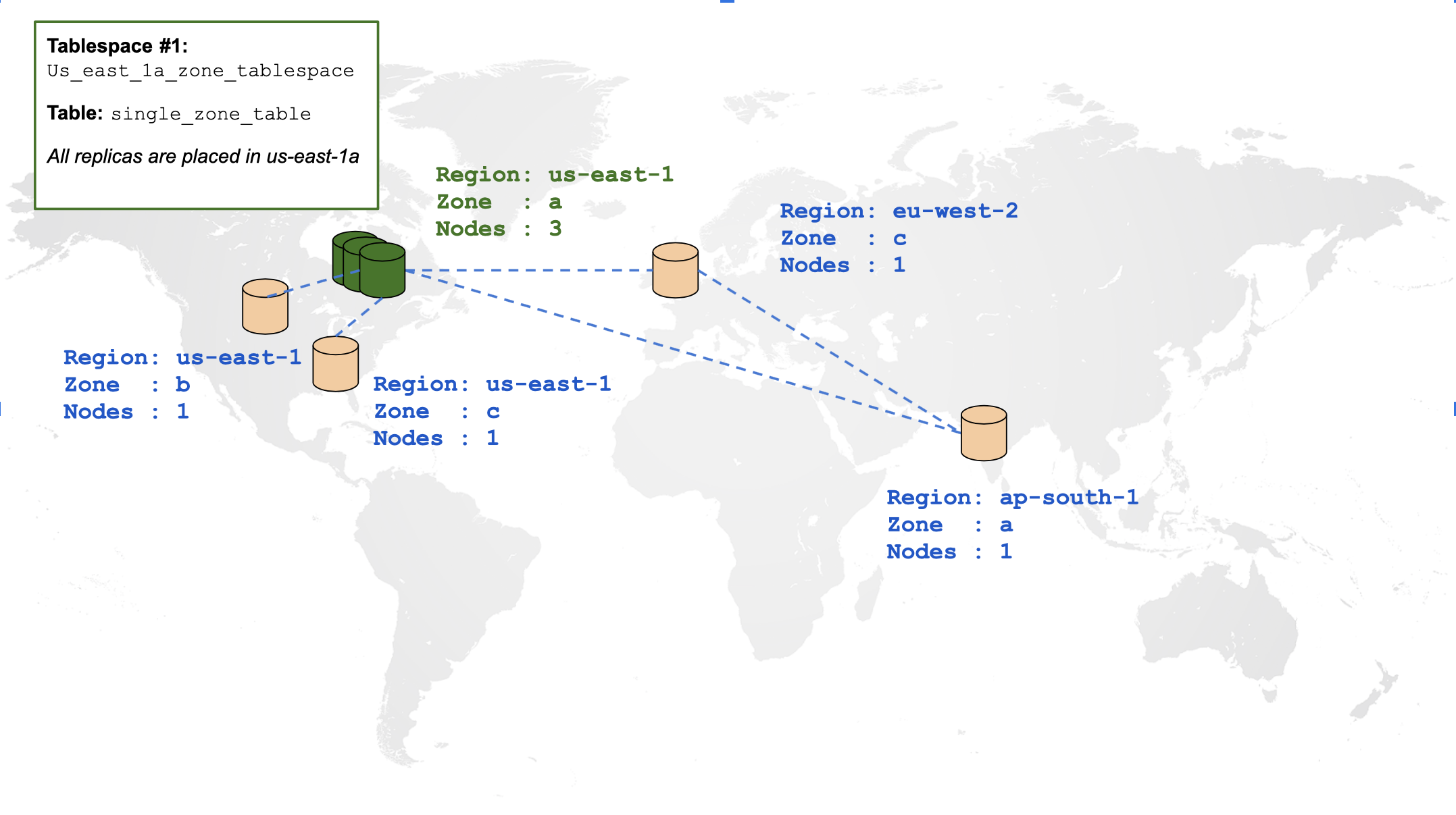
By default, creating any tables in the preceding cluster spreads all of its data across all regions. Using tablespaces, you can constrain table data in a single zone. The placement policy is illustrated using the following diagram:
![Single Zone Table](/images/explore/tablespaces/single_zone_table.png)

Create a tablespace outlining the preceding placement policy and a table associated with that tablespace:

```sql
CREATE TABLESPACE us_east_1a_zone_tablespace
  WITH (replica_placement='{"num_replicas": 3, "placement_blocks": [
    {"cloud":"aws","region":"us-east-1","zone":"us-east-1a","min_num_replicas":3}]}');

CREATE TABLE single_zone_table (id INTEGER, field text)
  TABLESPACE us_east_1a_zone_tablespace SPLIT INTO 1 TABLETS;
```

To view your tablespaces, you can enter the following command:

```sql
SELECT * FROM pg_tablespace;
```

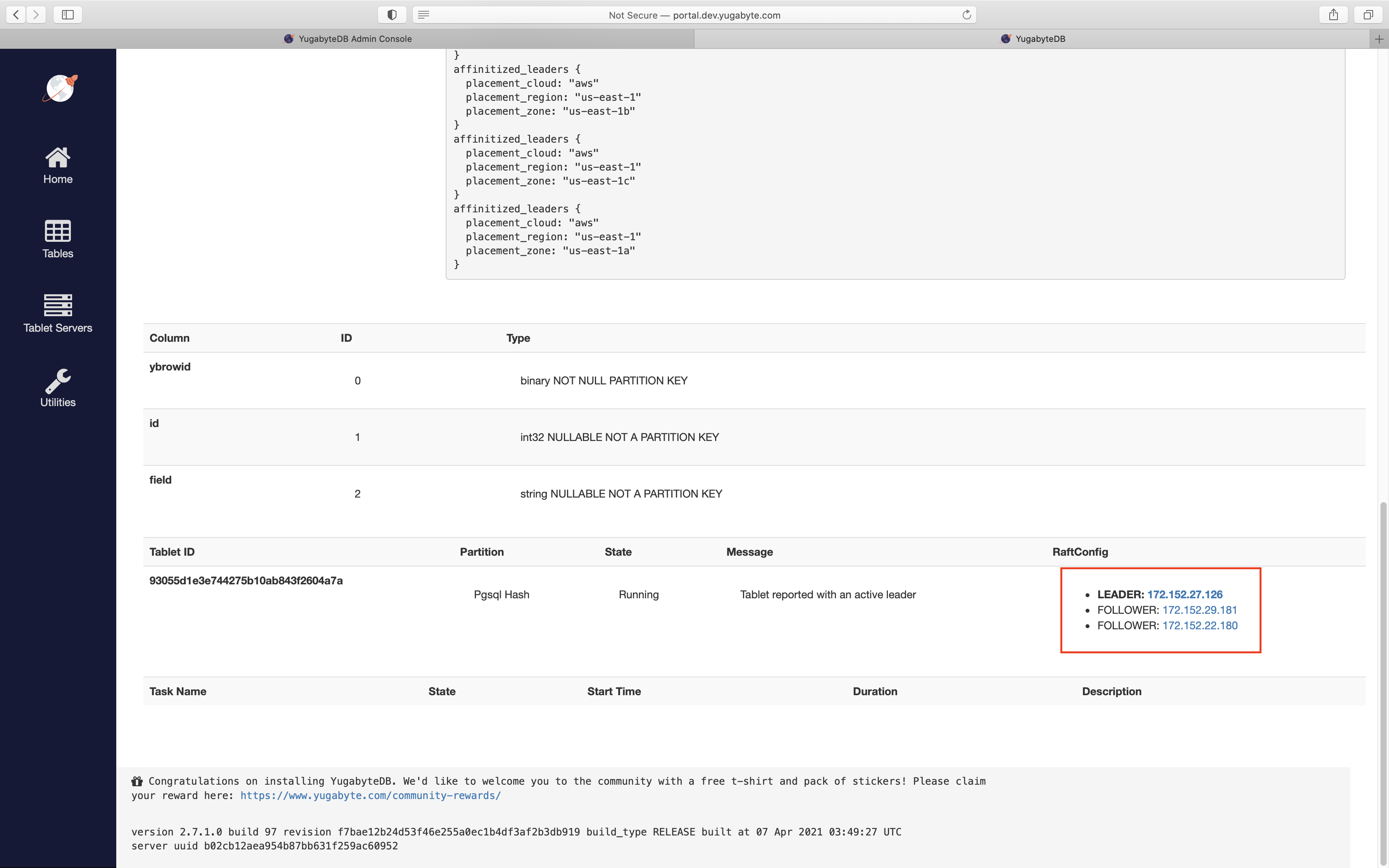
Note from the preceding cluster configuration that the nodes in us-east-1a were 172.152.29.181, 172.152.27.126, and 172.152.22.180. By navigating to the table view in the YB-Master UI, you can verify that the tablet created for this table was indeed placed in us_east_1a_zone:
![YB-Master UI: Tablets of the single zone table](/images/explore/tablespaces/single_zone_table_tablet_distribution.png)

To measure the latencies incurred for INSERTs and SELECTs on this table, where the client is in us-east-1a zone, enter the following command:

```sql
yugabyte=# INSERT INTO single_zone_table VALUES (1, 'field1'), (2, 'field2'), (3, 'field3');
```

```output
Time: 4.676 ms
```

```sql
yugabyte=# SELECT * FROM single_zone_table;
```

```output
 id | field
----+--------
  2 | field2
  1 | field1
  3 | field3
(3 rows)

Time: 1.880 ms
```

## Create a multi-zone table

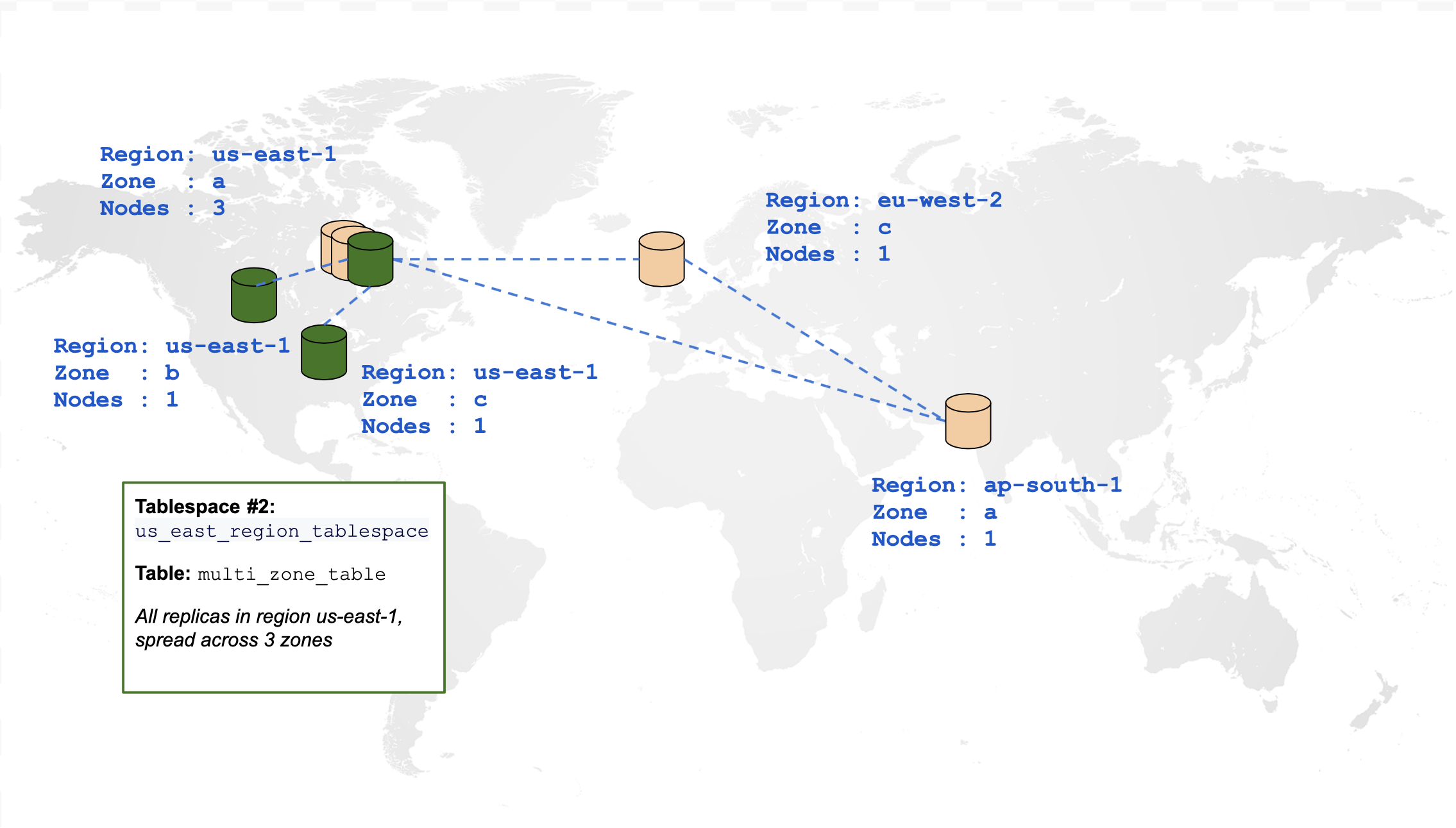
The following diagram is a graphical representation of a table that is spread across multiple zones in the same region:
![Multi Zone Table](/images/explore/tablespaces/multi_zone_table.png)

```sql
CREATE TABLESPACE us_east_region_tablespace
  WITH (replica_placement='{"num_replicas": 3, "placement_blocks": [
    {"cloud":"aws","region":"us-east-1","zone":"us-east-1a","min_num_replicas":1},
    {"cloud":"aws","region":"us-east-1","zone":"us-east-1b","min_num_replicas":1},
    {"cloud":"aws","region":"us-east-1","zone":"us-east-1c","min_num_replicas":1}]}');

CREATE TABLE multi_zone_table (id INTEGER, field text)
  TABLESPACE us_east_region_tablespace SPLIT INTO 1 TABLETS;
```

The following demonstrates how to measure the latencies incurred for INSERTs and SELECTs on this table, where the client is in us-east-1a zone:

```sql
yugabyte=# INSERT INTO multi_zone_table VALUES (1, 'field1'), (2, 'field2'), (3, 'field3');
```

```output
Time: 11.825 ms
```

```sql
yugabyte=# SELECT * FROM multi_zone_table;
```

```output
 id | field
----+--------
  1 | field1
  3 | field3
  2 | field2
(3 rows)

Time: 4.145 ms
```

## Create a multi-region table

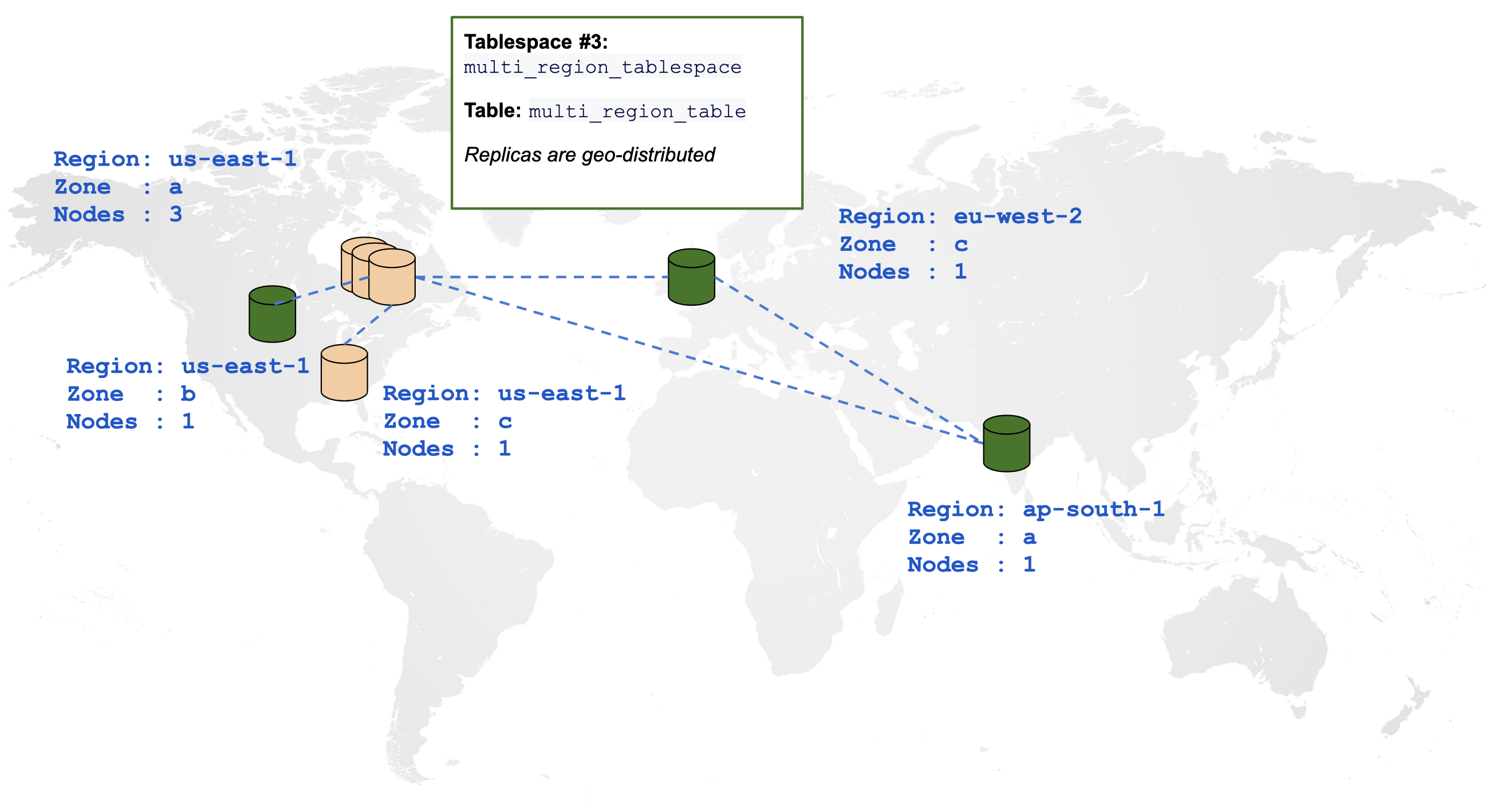
The following diagram is a graphical representation of a table spread across multiple regions:
![Multi Region Table](/images/explore/tablespaces/multi_region_table.png)

```sql
CREATE TABLESPACE multi_region_tablespace
  WITH (replica_placement='{"num_replicas": 3, "placement_blocks": [
    {"cloud":"aws","region":"us-east-1","zone":"us-east-1b","min_num_replicas":1},
    {"cloud":"aws","region":"ap-south-1","zone":"ap-south-1a","min_num_replicas":1},
    {"cloud":"aws","region":"eu-west-2","zone":"eu-west-2c","min_num_replicas":1}]}');

CREATE TABLE multi_region_table (id INTEGER, field text)
  TABLESPACE multi_region_tablespace SPLIT INTO 1 TABLETS;
```

The following demonstrates how to measure the latencies incurred for INSERTs and SELECTs on this table, where the client is in us-east-1a zone:

```sql
yugabyte=# INSERT INTO multi_region_table VALUES (1, 'field1'), (2, 'field2'), (3, 'field3');
```

```output
Time: 863.616 ms
```

```sql
yugabyte=# SELECT * FROM multi_region_table;
```

```output
 id | field
----+--------
  3 | field3
  2 | field2
  1 | field1
(3 rows)

Time: 337.154 ms
```

### Use wildcards for zones

Sometimes, you may want to use the wildcard `*` in the placement block list. This is handy when the number of zones is greater than the replication factor (RF) of your cluster. In these cases, you can use the wildcard to randomly choose any of the zones in a given region, or any of the regions in a given cloud.

For example, assume a cluster is spread out over regions `us-east-1` (AZs `us-east-1a`, `us-east-1b`), `us-central-1` (AZs `us-central-1a`, `us-central-1b`) and `us-west-1` (AZs `us-west-1a`, `us-west-1b`) and you want to create an RF3 tablespace.

The tablespace in the following example allows copies to be placed in each of the three regions without specifying the exact AZs in those regions. This can increase the resilience of the cluster compared to explicitly specifying exactly one AZ per region. However, note that when using wildcard placement mode, each AZ in the region must be over-provisioned appropriately to handle the tablets that it may receive from the other AZ's failover.

```sql
CREATE TABLESPACE multi_region_wildcard_tablespace
  WITH (replica_placement='{"num_replicas": 3, "placement_blocks": [
    {"cloud":"aws","region":"us-east-1","zone":"*","min_num_replicas":1},
    {"cloud":"aws","region":"us-west-1","zone":"*","min_num_replicas":1},
    {"cloud":"aws","region":"us-central-1","zone":"*","min_num_replicas":1}]}');

CREATE TABLE multi_region_table (id INTEGER, field text)
  TABLESPACE multi_region_wildcard_tablespace;
```

Similarly, the following tablespace allows copies to be placed in any zone and region in the `aws` cloud.

```sql
CREATE TABLESPACE aws_wildcard_tablespace
  WITH (replica_placement='{"num_replicas": 3, "placement_blocks": [
    {"cloud":"aws","region":"*","zone":"*","min_num_replicas":3}]}');

CREATE TABLE aws_wildcard_table (id INTEGER, field text)
  TABLESPACE aws_wildcard_tablespace;
```

{{< note title="Tablet distribution" >}}
There is no guarantee that tablets are uniformly distributed over independent AZs in this case. Comment on issue {{<issue 19862>}} if this is a feature that you are interested in.
{{</note>}}

## Leader preference

{{< note title=" " >}}

The example below expects the following servers to be added to the cluster:

```sh
./bin/yugabyted start                               \
  --base_dir=/home/yugabyte/127.0.0.8/yugabyte-data \
  --advertise_address=127.0.0.8                     \
  --join=127.0.0.1                                  \
  --cloud_location=aws.us-east-1.us-east-1b

./bin/yugabyted start                               \
  --base_dir=/home/yugabyte/127.0.0.9/yugabyte-data \
  --advertise_address=127.0.0.9                     \
  --join=127.0.0.1                                  \
  --cloud_location=aws.us-east-2.us-east-2a

  ./bin/yugabyted start                              \
  --base_dir=/home/yugabyte/127.0.0.10/yugabyte-data \
  --advertise_address=127.0.0.10                     \
  --join=127.0.0.1                                   \
  --cloud_location=aws.us-west-1.us-west-1a
```

{{< /note >}}

Leader preference helps optimize workloads that require distribution of data over multiple zones for zone-level fault tolerance, but which have clients only in a subset of those zones. It overrides the default behavior of spreading the tablet leaders across all placement zones of the tablespace, and instead places them closer to the clients.

The leaders handle all [reads](../../../explore/linear-scalability/scaling-reads/) and [writes](../../../explore/linear-scalability/scaling-writes/), which reduces the number of network hops, which in turn reduces latency for increased performance. Leader preference allows you to specify the zones in which to place the leaders when the system is stable, and fallback zones when an outage or maintenance occurs in the preferred zones.

In the following example, the tablespace is set up to have replicas in us-east-1, us-east-2, and us-west-1. This enables it to survive the loss of an entire region. The clients are located in us-east-1. By default, a third of the leaders would reside in us-west-1, which has a latency of 62ms from the clients.

![Multi Region Table](/images/explore/tablespaces/multi_region_latency.png)

However, setting `leader_preference` of us-east-1b to 1 (most preferred) informs the YugabyteDB load balancer to place all associated tablet leaders in this zone, dropping the latency to less than 1ms. If all the nodes in us-east-1a are unavailable, they fall back to the next preferred zone us-east-2a, which has a 12ms latency. The following example creates the tablespace with leader preferences specified:

```sql
CREATE TABLESPACE us_east1_region_tablespace
  WITH (replica_placement='{"num_replicas": 3, "placement_blocks": [
    {"cloud":"aws","region":"us-east-1","zone":"us-east-1b","min_num_replicas":1,"leader_preference":1},
    {"cloud":"aws","region":"us-east-2","zone":"us-east-2a","min_num_replicas":1,"leader_preference":2},
    {"cloud":"aws","region":"us-west-1","zone":"us-west-1a","min_num_replicas":1}]}');

CREATE TABLE preferred_leader_table (id INTEGER, field text)
  TABLESPACE us_east1_region_tablespace;
```

```sql
yugabyte=# INSERT INTO preferred_leader_table VALUES (1, 'field1'), (2, 'field2'), (3, 'field3');
```

```output
Time: 43.712 ms
```

```sql
yugabyte=# SELECT * FROM preferred_leader_table;
```

```output
 id | field
----+--------
  3 | field3
  2 | field2
  1 | field1
(3 rows)

Time: 1.052 ms
```

You can specify non-zero contiguous integer values for each zone. When multiple zones have the same preference, the leaders are evenly spread across them. Zones without any values are least preferred.

You can check the overall leader distribution and [cluster level leader preference](../../../admin/yb-admin/#set-preferred-zones) on the [tablet-servers page](http://127.0.0.1:7000/tablet-servers).

![Multi Region Table](/images/explore/tablespaces/leader_preference_admin_ui.png)

## Read replicas

{{<tags/feature/ea idea="2006">}}[Read replica](../../multi-region-deployments/read-replicas-ysql/) clusters in YugabyteDB are a set of follower nodes that maintain asynchronously replicated copies of tablets in the primary cluster. These TServers are configured using their own [placement_uuid](../../../reference/configuration/yb-tserver/#placement-uuid) flag that is different from that of the primary cluster.

You configure tablespaces with read replica nodes using the `read_replica_placement` configuration option. Tables that you add to the tablespace automatically have copies of their tablets placed on the read replica nodes.

For example, the following commands create a tablespace with a read replica, and then create a table with 3 copies in us-east-1a (the primary cluster) and 2 copies on the read replica in us-east-2a. Note that this assumes that read replica TServers have already been started, as described in [Read replica deployment](../../../deploy/multi-dc/read-replica-clusters/).

```sql
CREATE TABLESPACE us_east_1_with_rr_tablespace WITH (
  replica_placement='{
  "num_replicas": 3,
  "placement_blocks": [
    {
      "cloud": "aws",
      "region": "us-east-1",
      "zone": "us-east-1a",
      "min_num_replicas": 3
    }
  ]
}', read_replica_placement='[
  {
    "num_replicas": 2,
    "placement_uuid": "9d8f5715-2e7c-4e64-8e34-35f510c12e66",
    "placement_blocks": [
      {
        "cloud": "aws",
        "region": "us-east-2",
        "zone": "us-east-2a",
        "min_num_replicas": 2
      },
      }
    ]
  }
]');

CREATE TABLE single_zone_table_with_read_replica (id INTEGER, field text)
  TABLESPACE us_east_1_with_rr_tablespace;
```

The `placement_uuid` field in the `read_replica_placement` section needs to be set to the [placement ID of the read replica cluster](../../../admin/yb-admin/#add-read-replica-placement-info). To obtain the placement ID, use the [get-universe-config](../../../admin/yb-admin/#get-universe-config) yb-admin command.

You can also use the [wildcard](#use-wildcards-for-zones) `*` when specifying placement in read replicas.

## Indexes

Like tables, indexes can be associated with a tablespace. If a table has more than one index, YugabyteDB picks the closest index to serve the query. The following example creates three indexes for each region occupied by the `multi_region_table` from above:

```sql
CREATE TABLESPACE us_east_tablespace
  WITH (replica_placement='{"num_replicas": 1, "placement_blocks": [
    {"cloud":"aws","region":"us-east-1","zone":"us-east-1b","min_num_replicas":1}]}');

CREATE TABLESPACE ap_south_tablespace
  WITH (replica_placement='{"num_replicas": 1, "placement_blocks": [
    {"cloud":"aws","region":"ap-south-1","zone":"ap-south-1a","min_num_replicas":1}]}');

CREATE TABLESPACE eu_west_tablespace
  WITH (replica_placement='{"num_replicas": 1, "placement_blocks": [
    {"cloud":"aws","region":"eu-west-2","zone":"eu-west-2c","min_num_replicas":1}]}');

CREATE INDEX us_east_idx ON multi_region_table(id) INCLUDE (field) TABLESPACE us_east_tablespace;
CREATE INDEX ap_south_idx ON multi_region_table(id) INCLUDE (field) TABLESPACE ap_south_tablespace;
CREATE INDEX eu_west_idx ON multi_region_table(id) INCLUDE (field) TABLESPACE eu_west_tablespace;
```

Run the following EXPLAIN command by connecting to each region:

```sql
EXPLAIN SELECT * FROM multi_region_table WHERE id=3;
```

EXPLAIN output for querying the table from `us-east-1`:

```output
                                         QUERY PLAN
---------------------------------------------------------------------------------------------
 Index Only Scan using us_east_idx on multi_region_table  (cost=0.00..5.06 rows=10 width=36)
   Index Cond: (id = 3)
(2 rows)
```

EXPLAIN output for querying the table from `ap-south-1`:

```output
                                          QUERY PLAN
----------------------------------------------------------------------------------------------
 Index Only Scan using ap_south_idx on multi_region_table  (cost=0.00..5.06 rows=10 width=36)
   Index Cond: (id = 3)
(2 rows)
```

EXPLAIN output for querying the table from `eu-west-2`:

```output
                                         QUERY PLAN
---------------------------------------------------------------------------------------------
 Index Only Scan using eu_west_idx on multi_region_table  (cost=0.00..5.06 rows=10 width=36)
   Index Cond: (id = 3)
(2 rows)
```

## Change to a different tablespace

The tablespace of a table, index, or materialized view can be altered after the object has been created. Suppose you have a single-zone table in `us-east-1a`:

```sql
yugabyte=# CREATE TABLE critical_table (id INTEGER, field text)
yugabyte-#   TABLESPACE us_east_1a_zone_tablespace SPLIT INTO 1 TABLETS;
```

To check the placement of the tablets for this table, first navigate to the YB-Master UI, then click on "Tables" on the left:

![YB-Master UI: Tables page](/images/explore/tablespaces/1_tables.png)

Then, click on `critical_table`:

![YB-Master UI: critical_table page](/images/explore/tablespaces/2_critical_table_initial.png)

You can see the assigned placement policy under "Replication info". Under "RaftConfig", see that the replicas were placed on 127.0.0.1, 127.0.0.6, and 127.0.0.7. Clicking on "Tablet Servers" in the sidebar, you can see that these are the three nodes in us-east-1a, as expected.

Suppose you want to make this table resilient to single-zone failures. You can accomplish this by altering its tablespace to the multi-zone `us_east_region_tablespace`, where it will have replicas in the us-east-1a, us-east-1b, and us-east-1c regions:

```sql
yugabyte=# ALTER TABLE critical_table SET TABLESPACE us_east_region_tablespace;
```

```output
NOTICE:  Data movement for table single_zone_table is successfully initiated.
DETAIL:  Data movement is a long running asynchronous process and can be monitored by checking the tablet placement in http://<YB-Master-host>:7000/tables
```

You can see the replication info for our table has changed:

![YB-Master UI: critical_table page 2](/images/explore/tablespaces/4_critical_table_final.png)

The RaftConfig has also changed to match the new tablespace:

![YB-Master UI: critical_table raft configuration](/images/explore/tablespaces/5_critical_table_raft_config_final.png)

## What's next?

The following features will be supported in upcoming releases:

- Support for `ALTER TABLESPACE`.
- Setting read replica placements using tablespaces.
