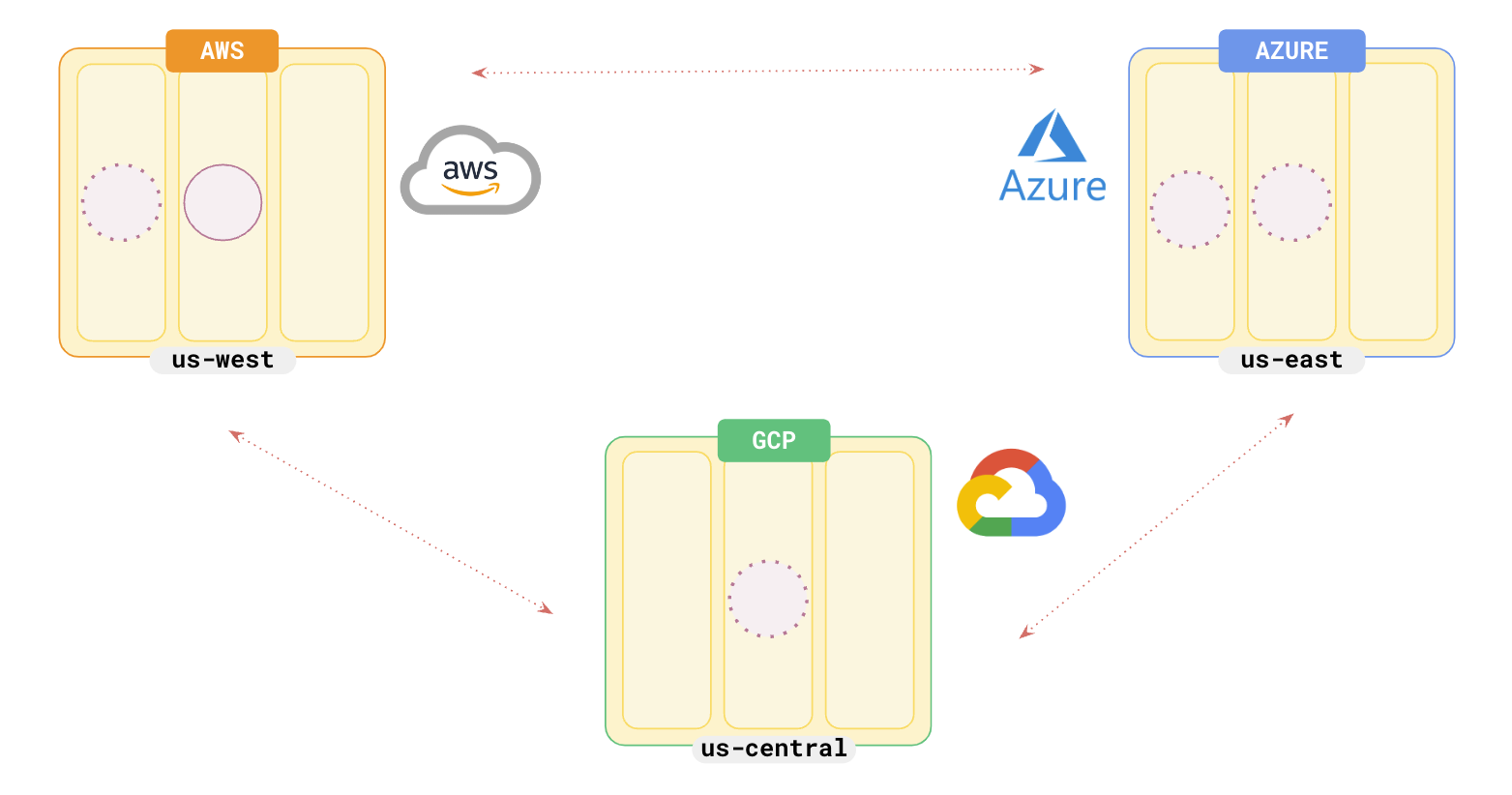
You can create a multi-cloud YugabyteDB universe spanning multiple geographic regions and cloud providers. The following sections describe how to set up a multi-cloud universe using [yugabyted](../../../reference/configuration/yugabyted/) or an on-prem provider in [YugabyteDB Anywhere](../../../yugabyte-platform/create-deployments/create-universe-multi-cloud/).

## Topology

For illustration, you can set up a 6-node universe across AWS (us-west), GCP (us-central), and Azure (us-east), with a replication factor of 5.

{{<note title="Note">}}
To be ready for a any region failure, you should opt for a replication factor of 7.
{{</note>}}

![Multi-cloud Yugabyte](/images/develop/multicloud/multicloud-topology.png)

<!-- begin: nav tabs -->
{{<nav/tabs list="local,anywhere" active="local"/>}}

{{<nav/panels>}}
{{<nav/panel name="local" active="true">}}
<!-- BEGIN: local cluster setup instructions -->

{{<warning title="VPC peering">}}
Although for the current example, you **do not** have to set up VPC peering, for different clouds to be able to talk to each other, you need to set up multi-cloud VPC peering through a VPN tunnel. See [Set up VPC peering](../../../yugabyte-platform/create-deployments/create-universe-multi-cloud/#set-up-vpc-peering) for detailed information.
{{</warning>}}

## Set up the multi-cloud universe

For illustration, set up a 6-node universe with 2 nodes each in AWS, GCP, and Azure.

### First cloud - AWS

{{<setup/local
    numnodes="2"
    rf="5"
    basedir="/tmp/ydb-aws-"
    status="no"
    dataplacement="no"
    locations="aws.us-west-2.us-west-2a,aws.us-west-2.us-west-2a">}}

### Second cloud - GCP

{{<note title="Note">}} These nodes in GCP will join the cluster in AWS (127.0.0.1) {{</note>}}

{{<setup/local
    numnodes="2"
    rf="5"
    destroy="no"
    ips="127.0.0.3,127.0.0.4"
    masterip="127.0.0.1"
    basedir="/tmp/ydb-gcp-"
    dataplacement="no"
    status="no"
    locations="gcp.us-central-1.us-central-1a,gcp.us-central-1.us-central-1a">}}

### Third cloud - Azure

{{<note title="Note">}} These nodes in Azure will join the cluster in AWS (127.0.0.1) {{</note>}}

{{<setup/local
    numnodes="2"
    rf="5"
    destroy="no"
    ips="127.0.0.5,127.0.0.6"
    masterip="127.0.0.1"
    basedir="/tmp/ydb-azu-"
    dataplacement="yes"
    status="yes"
    locations="azu.us-east-1.us-east-1a,azu.us-east-1.us-east-1a">}}

You should have a 6-node cluster with 2 nodes in each cloud provider as follows:

![Multi-cloud Yugabyte](/images/develop/multicloud/multicloud-6nodes.png)

<!-- END: local cluster setup instructions -->
{{</nav/panel>}}
<!-- multi-cloud not currently supported in YBM
{{<nav/panel name="cloud">}} {{<setup/cloud>}} {{</nav/panel>}}
-->
{{<nav/panel name="anywhere">}}

{{<note>}}
To set up a multi-cloud universe in YugabyteDB Anywhere, refer to [Create a multi-cloud universe](../../../yugabyte-platform/create-deployments/create-universe-multi-cloud/).
{{</note>}}

<!-- END: YBA cluster setup instructions -->
{{</nav/panel>}}
{{</nav/panels>}}
<!-- end: nav tabs -->

## Multi-cloud application

### Scenario

Suppose that you have retail applications that perform transactions and want to deploy them closer to users who are in the `east` and `west` regions of the US. Both applications need fraud detection, which needs to be fast.

### Deployment

You can choose from a list of [design patterns for global applications](../../build-global-apps/) for designing your multi-cloud applications using the following setup.

As you want your retail applications to be closer to your users, you deploy them in the data centers at AWS (us-west) and AZU (us-east). As both systems require fast fraud detection, and as the regions are far apart, you can opt to deploy your fraud detection infrastructure on GCP as follows:
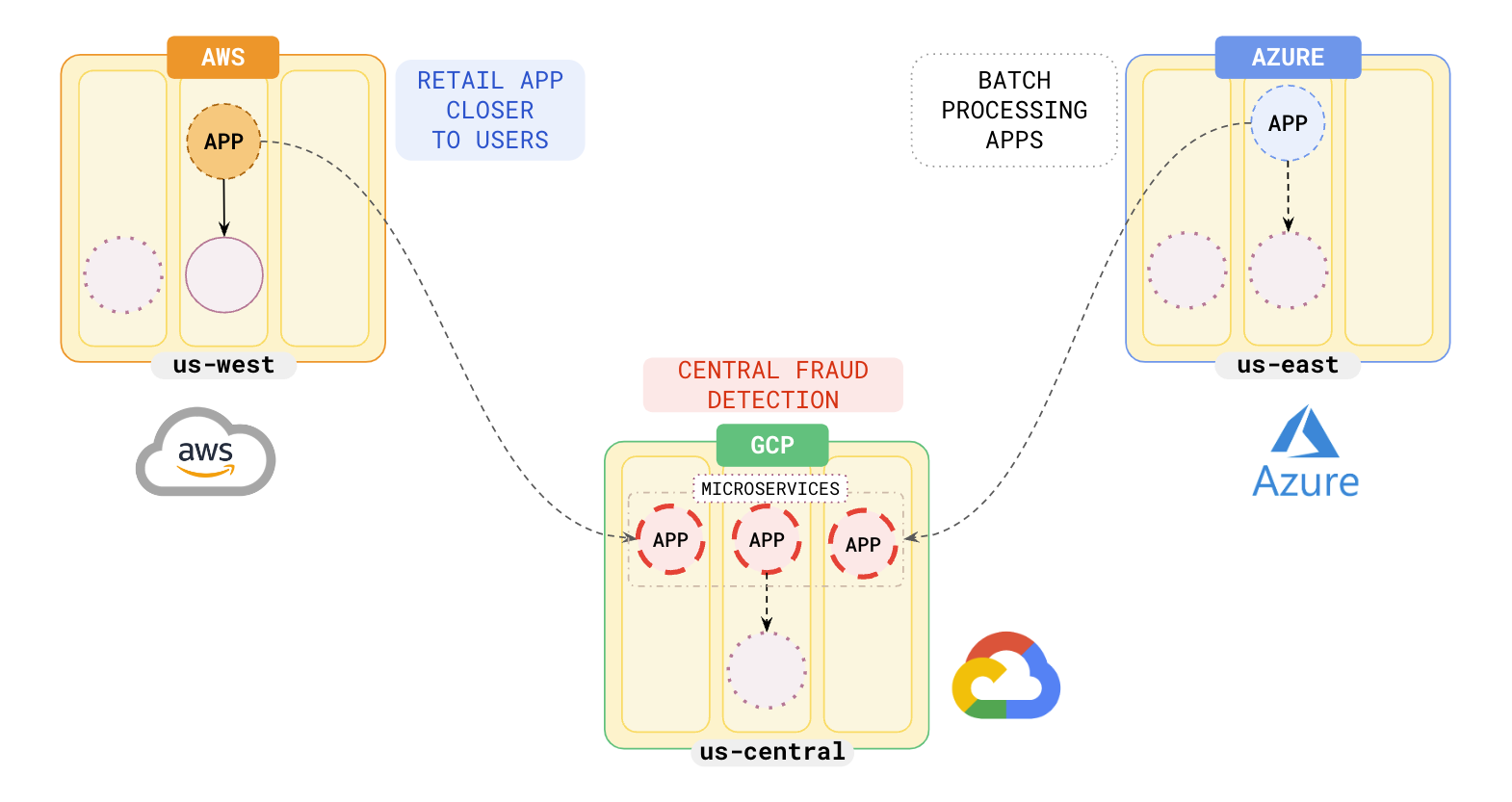
![Central fraud detection](/images/develop/multicloud/multicloud-fraud-detection.png)

## Hybrid cloud

You can also deploy your applications using a combination of private data centers and public clouds. For example, you could deploy your retail applications in your on-prem data centers and your fraud detection systems in the public cloud. See [Hybrid cloud](../hybrid-cloud) for more information.

## Failover

On a region failure, the multi-cloud YugabyteDB universe will automatically failover to either of the remaining cloud regions depending on the [application design pattern](../../build-global-apps/) you chose for your setup. In the above example, if you had set the order of the preferred zones to be `aws:1 azu:2`, then when `AWS` fails, applications will move to `AZU` and the applications will use the data in `us-east` to serve users without any data loss.
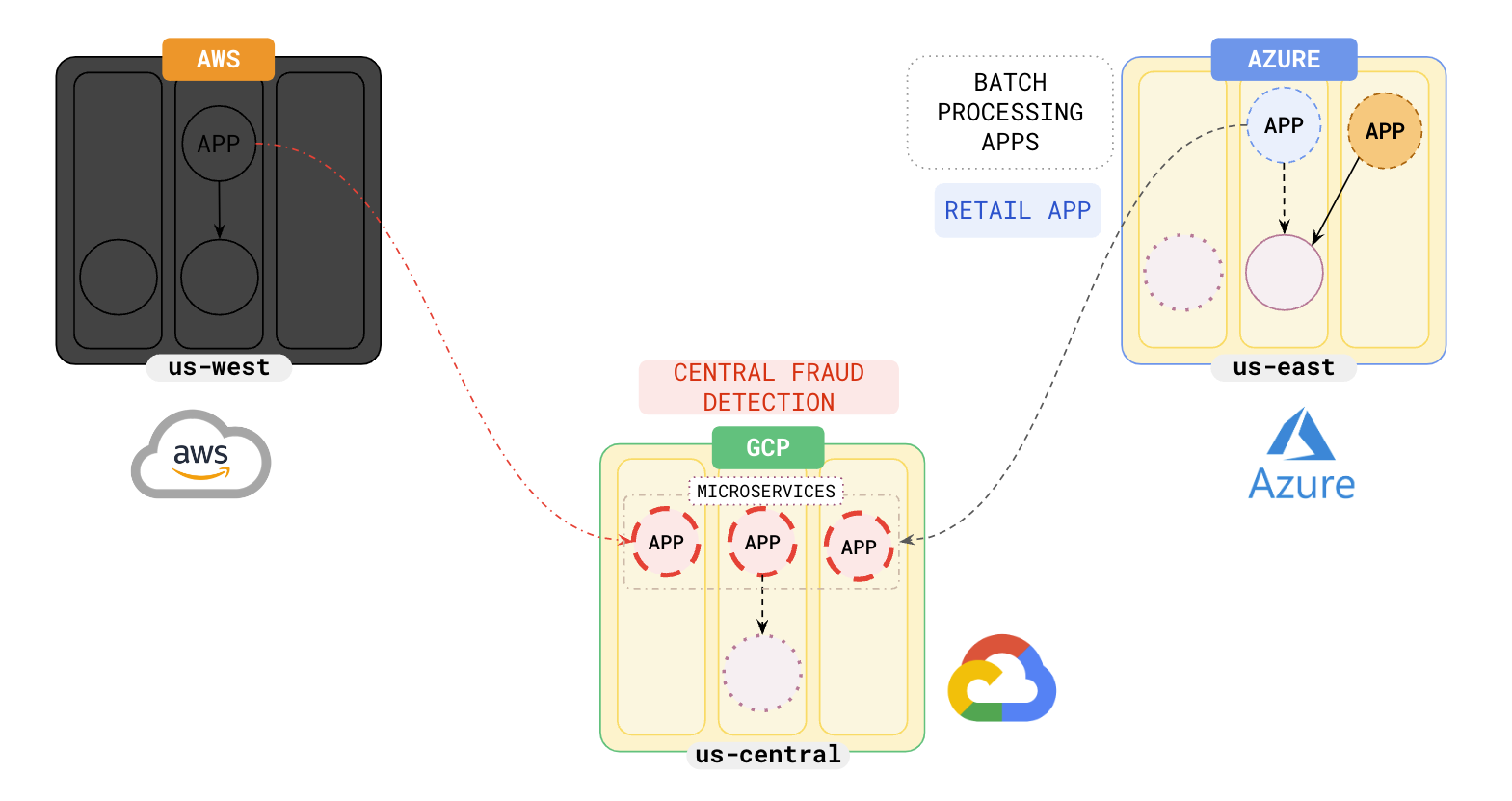
![Multi-cloud Yugabyte](/images/develop/multicloud/multicloud-failover.png)

You could choose closer regions to avoid an increase in latency on failover.

## Learn more

- [Build global applications](../../build-global-apps/)
- [Global database failover](../../build-global-apps/global-database#failover)
- [Improve latencies with closer regions](../../build-global-apps/global-database#improve-latencies-with-closer-regions)