YugabyteDB JDBC smart driver is a JDBC driver for [YSQL](../../../../api/ysql/) built on the [PostgreSQL JDBC driver](https://github.com/pgjdbc/pgjdbc), with additional connection load balancing features.
For more information on the YugabyteDB Java smart driver, see the following:
- [YugabyteDB smart drivers for YSQL](../../smart-drivers/)
- [CRUD operations](../yugabyte-jdbc)
- [GitHub repository](https://github.com/yugabyte/pgjdbc)
- [Smart Driver architecture](https://github.com/yugabyte/yugabyte-db/blob/master/architecture/design/smart-driver.md)
## Download the driver dependency
YugabyteDB JDBC Driver is available as maven dependency. Download the driver by adding the following dependency entries in the java project.
### Maven dependency
To get the driver and HikariPool from Maven, add the following dependencies to the Maven project:
```xml
com.yugabyte
jdbc-yugabytedb
{{< version-driver-java >}}
com.zaxxer
HikariCP
5.0.1
```
### Gradle dependency
To get the driver and HikariPool, add the following dependencies to the Gradle project:
```java
// https://mvnrepository.com/artifact/org.postgresql/postgresql
implementation 'com.yugabyte:jdbc-yugabytedb:{{< version-driver-java >}}'
implementation 'com.zaxxer:HikariCP:5.0.1'
```
## Fundamentals
Learn how to perform common tasks required for Java application development using the YugabyteDB JDBC driver.
{{< note title="Note">}}
The driver requires YugabyteDB version 2.7.2.0 or higher, and Java 8 or above.
{{< /note >}}
### Load balancing connection properties
The following connection properties need to be added to enable load balancing:
- `load-balance` - enable cluster-aware load balancing by setting this property to one of the [allowed values](../../smart-drivers/#node-type-aware-load-balancing) other than `false`; disabled by default.
- `topology-keys` - provide comma-separated geo-location values to enable topology-aware load balancing. Geo-locations can be provided as `cloud.region.zone`. Specify all zones in a region as `cloud.region.*`. To designate fallback locations for when the primary location is unreachable, specify a priority in the form `:n`, where `n` is the order of precedence. For example, `cloud1.datacenter1.rack1:1,cloud1.datacenter1.rack2:2`.
By default, the driver refreshes the list of nodes every 300 seconds (5 minutes ). You can change this value by including the `yb-servers-refresh-interval` parameter.
For more information, see [Cluster-aware load balancing](../../smart-drivers/#cluster-aware-load-balancing).
### Use the driver
The YugabyteDB JDBC driver's driver class is `com.yugabyte.Driver`. The driver package includes a `YBClusterAwareDataSource` class that uses one initial contact point for the YugabyteDB cluster as a means of discovering all the nodes and, if required, refreshing the list of live endpoints with every new connection attempt. The refresh is triggered if stale information (by default, older than 5 minutes) is discovered.
To use the driver, do the following:
- Pass new connection properties for load balancing in the connection URL or properties pool.
To enable uniform load balancing across all servers, you set the `load-balance` property to `true` in the URL, as per the following example:
```java
String yburl = "jdbc:yugabytedb://127.0.0.1:5433/yugabyte?user=yugabyte&password=yugabyte&load-balance=true";
DriverManager.getConnection(yburl);
```
To provide alternate hosts during the initial connection in case the first address fails, specify multiple hosts in the connection string, as follows:
```java
String yburl = "jdbc:yugabytedb://127.0.0.1:5433,127.0.0.2:5433,127.0.0.3:5433/yugabyte?user=yugabyte&password=yugabyte&load-balance=true";
DriverManager.getConnection(yburl);
```
After the driver establishes the initial connection, it fetches the list of available servers from the universe, and performs load balancing of subsequent connection requests across these servers.
To specify topology keys, you set the `topology-keys` property to comma separated values, as per the following example:
```java
String yburl = "jdbc:yugabytedb://127.0.0.1:5433/yugabyte?user=yugabyte&password=yugabyte&load-balance=true&topology-keys=cloud1.region1.zone1,cloud1.region1.zone2";
DriverManager.getConnection(yburl);
```
- Configure `YBClusterAwareDataSource` for uniform load balancing and then use it to create a connection, as per the following example:
```java
String jdbcUrl = "jdbc:yugabytedb://127.0.0.1:5433/yugabyte";
YBClusterAwareDataSource ds = new YBClusterAwareDataSource();
ds.setUrl(jdbcUrl);
// Set topology keys to enable topology-aware distribution
ds.setTopologyKeys("cloud1.region1.zone1,cloud1.region2.zone2");
// Provide more end points to prevent first connection failure
// if an initial contact point is not available
ds.setAdditionalEndpoints("127.0.0.2:5433,127.0.0.3:5433");
Connection conn = ds.getConnection();
```
- Configure `YBClusterAwareDataSource` with a pooling solution such as Hikari and then use it to create a connection, as per the following example:
```java
Properties poolProperties = new Properties();
poolProperties.setProperty("dataSourceClassName", "com.yugabyte.ysql.YBClusterAwareDataSource");
poolProperties.setProperty("maximumPoolSize", 10);
poolProperties.setProperty("dataSource.serverName", "127.0.0.1");
poolProperties.setProperty("dataSource.portNumber", "5433");
poolProperties.setProperty("dataSource.databaseName", "yugabyte");
poolProperties.setProperty("dataSource.user", "yugabyte");
poolProperties.setProperty("dataSource.password", "yugabyte");
// If you want to provide additional end points
String additionalEndpoints = "127.0.0.2:5433,127.0.0.3:5433,127.0.0.4:5433,127.0.0.5:5433";
poolProperties.setProperty("dataSource.additionalEndpoints", additionalEndpoints);
// If you want to load balance between specific geo locations using topology keys
String geoLocations = "cloud1.region1.zone1,cloud1.region2.zone2";
poolProperties.setProperty("dataSource.topologyKeys", geoLocations);
poolProperties.setProperty("poolName", name);
HikariConfig config = new HikariConfig(poolProperties);
config.validate();
HikariDataSource ds = new HikariDataSource(config);
Connection conn = ds.getConnection();
```
The driver also supports connecting to multiple YugabyteDB clusters, while keeping connections balanced in each connected cluster. For more information, refer to [Connect to multiple clusters](../../smart-drivers/#connect-to-multiple-clusters)
## Try it out
This tutorial shows how to use the YugabyteDB JDBC Driver with YugabyteDB. It starts by creating a three-node cluster with a replication factor of 3. This tutorial uses the [yugabyted](../../../../reference/configuration/yugabyted/) utility.
Next, you use [yb-sample-apps](https://github.com/yugabyte/yb-sample-apps/tree/master) to demonstrate the driver's load balancing features and create a Maven project to learn how to use the driver in an application.
{{< note title="Note">}}
The driver requires YugabyteDB v2.7.2.0 or later, and Java 8 or above.
{{< /note>}}
### Install YugabyteDB and create a local cluster
Create a universe with a 3-node RF-3 cluster with some fictitious geo-locations assigned. The placement values used are just tokens and have nothing to do with actual AWS cloud regions and zones.
```sh
$ cd
```
To create a multi-zone cluster, do the following:
1. Start the first node by running the yugabyted start command, passing in the `--cloud_location` and `--fault_tolerance` flags to set the node location details, as follows:
```sh
./bin/yugabyted start --advertise_address=127.0.0.1 \
--base_dir=$HOME/yugabyte-{{< yb-version version="stable" >}}/node1 \
--cloud_location=aws.us-east-1.us-east-1a \
--fault_tolerance=zone
```
1. Start the second and the third node on two separate VMs using the `--join` flag.
For the second node, use the IP address of the first node in the `--join` flag:
```sh
./bin/yugabyted start --advertise_address=127.0.0.2 \
--join=127.0.0.1 \
--base_dir=$HOME/yugabyte-{{< yb-version version="stable" >}}/node2 \
--cloud_location=aws.us-east-1.us-east-1a \
--fault_tolerance=zone
```
For the third node, you can use the IP address of any currently running node in the universe (for example, the first or the second node) in the `--join` flag:
```sh
./bin/yugabyted start --advertise_address=127.0.0.3 \
--join=127.0.0.1 \
--base_dir=$HOME/yugabyte-{{< yb-version version="stable" >}}/node3 \
--cloud_location=aws.us-east-1.us-east-1b \
--fault_tolerance=zone
```
### Check uniform load balancing using yb-sample-apps
Download the yb-sample-apps JAR file.
```sh
wget https://github.com/yugabyte/yb-sample-apps/releases/download/v1.4.0/yb-sample-apps.jar
```
Run the SqlInserts workload application, which creates multiple threads that perform read and write operations on a sample table created by the app. Uniform load balancing is enabled by default in all Sql* workloads of the yb-sample-apps, including SqlInserts.
```sh
java -jar yb-sample-apps.jar \
--workload SqlInserts \
--num_threads_read 15 --num_threads_write 15 \
--nodes 127.0.0.1:5433,127.0.0.2:5433,127.0.0.3:5433
```
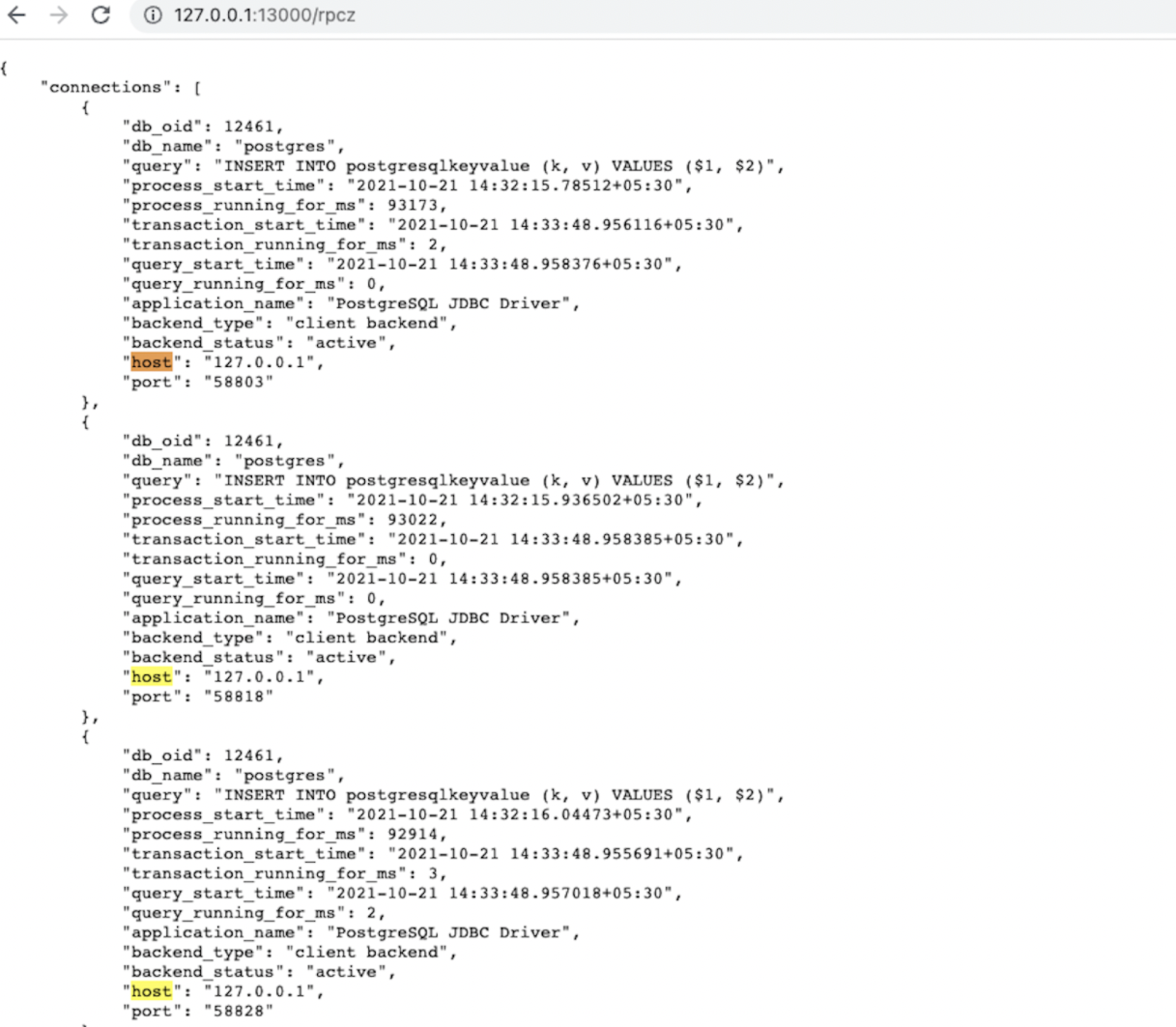
The application creates 30 connections, 1 for each reader and writer threads. To verify the behavior, wait for the app to create connections and then visit `http://:13000/rpcz` from your browser for each node to see that the connections are equally distributed among the nodes.
This URL presents a list of connections where each element of the list has some information about the connection as shown in the following screenshot. You can count the number of connections from that list, or search for the occurrence count of the `host` keyword on that webpage. Each node should have 10 connections.
### Check topology-aware load balancing using yb-sample-apps
For topology-aware load balancing, run the SqlInserts workload application with the `topology-keys1` property set to `aws.us-east-1.us-east-1a`; only two nodes are used in this case.
```sh
java -jar yb-sample-apps.jar \
--workload SqlInserts \
--nodes 127.0.0.1:5433,127.0.0.2:5433,127.0.0.3:5433 \
--num_threads_read 15 --num_threads_write 15 \
--topology_keys aws.us-east-1.us-east-1a
```
To verify the behavior, wait for the app to create connections and then navigate to `http://:13000/rpcz`. The first two nodes should have 15 connections each, and the third node should have zero connections.
### Clean up
When you're done experimenting, run the following command to destroy the local cluster:
```sh
./bin/yugabyted destroy --base_dir=$HOME/yugabyte-{{< yb-version version="stable" >}}/node1
./bin/yugabyted destroy --base_dir=$HOME/yugabyte-{{< yb-version version="stable" >}}/node2
./bin/yugabyted destroy --base_dir=$HOME/yugabyte-{{< yb-version version="stable" >}}/node3
```
## Other examples
To access sample applications that use the YugabyteDB JDBC driver, visit [YugabyteDB JDBC driver](https://github.com/yugabyte/pgjdbc).
To use the samples, complete the following steps:
- Install YugabyteDB by following the instructions in [Quick start](/stable/quick-start/macos/).
- Build the examples by running `mvn package`.
- Run the `run.sh` script, as per the following guideline:
```sh
./run.sh [-v] [-i] -D -
```
In the preceding command, replace:
- *[-v] [-i]* with `-v` if you want to run the script in `VERBOSE` mode.
- *[-v] [-i]* with `-i` if you want to run the script in `INTERACTIVE` mode.
- *[-v] [-i]* with `-v -i` if you want to run the script in both `VERBOSE` and `INTERACTIVE` mode at the same time.
- ** with the path to the directory where you installed YugabyteDB.
The following is an example of a shell command that runs the script:
```sh
./run.sh -v -i -D ~/yugabyte-2.7.2.0/
```
{{< note title="Note">}}
The driver requires YugabyteDB v2.7.2.0 or later.
{{< /note>}}
The `run` script starts a YugabyteDB cluster, demonstrates load balancing through Java applications, and then destroys the cluster.
When started, the script displays a menu with two options: `UniformLoadBalance` and `TopologyAwareLoadBalance`. Choose one of these options to run the corresponding script with its Java application in the background.