Change data capture (CDC) in YugabyteDB provides technology to ensure that any changes in data due to operations such as inserts, updates, and deletions are identified, captured, and made available for consumption by applications and other tools.
CDC using PostgreSQL protocol in YugabyteDB is based on the PostgreSQL Logical Replication model. The fundamental concept is that of the Replication Slot. A Replication Slot represents a stream of changes that can be replayed to the client in the order they were made on the origin server in a manner that preserves transactional consistency. This is the basis for the support for Transactional CDC in YugabyteDB. Where the strict requirements of Transactional CDC are not present, multiple replication slots can be used to stream changes from unrelated tables in parallel.
{{}}
See [Change data capture](../../../additional-features/change-data-capture/) for more details and limitations.
{{}}
## Architecture
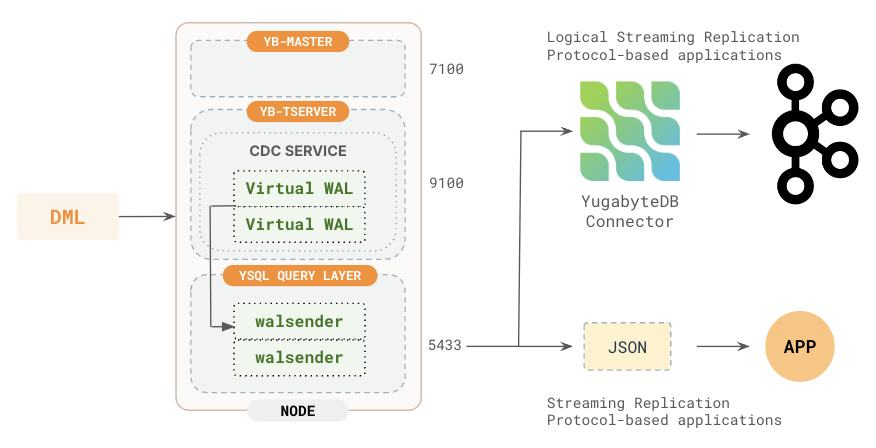
The following are the main components of the Yugabyte CDC solution:
1. CDC Service - Retrieves changes from the WAL of a specified shard starting from a given checkpoint.
2. Virtual WAL (VWAL) - Assembles changes from all the shards of user tables (under the publication) to maintain transactional consistency.
3. walsender - A special purpose PostgreSQL backend responsible for streaming changes to the client and handling acknowledgments.
### Data flow
Logical replication starts by copying a snapshot of the data on the publisher database. After that is done, changes on the publisher are streamed to the server as they occur in near real time.
To set up Logical Replication, an application will first have to create a replication slot. When a replication slot is created, a boundary is established between the snapshot data and the streaming changes. This boundary or `consistent_point` is a consistent state of the source database. It corresponds to a commit time (HybridTime value). Data from transactions with commit time <= commit time corresponding to the `consistent_point` are consumed as part of the initial snapshot. Changes from transactions with commit time greater than the commit time of the `consistent_point` are consumed in the streaming phase in transaction commit time order.
#### Initial snapshot
The initial snapshot data for each table is consumed by executing a corresponding snapshot query (SELECT statement) on that table. This snapshot query should be executed as of the database state corresponding to the `consistent_point`. This database state is represented by a value of HybridTime.
First, a `SET LOCAL yb_read_time TO ' ht'` command should be executed on the connection (session). The SELECT statement corresponding to the snapshot query should then be executed as part of the same transaction.
The HybridTime value to use in the `SET LOCAL yb_read_time` command is the value of the `snapshot_name` field that is returned by the `CREATE_REPLICATION_SLOT` command. Alternatively, it can be obtained by querying the `pg_replication_slots` view.
During Snapshot consumption, the snapshot data from all tables will be from the same consistent state (`consistent_point`). At the end of Snapshot consumption, the state of the target system is at/based on the `consistent_point`. History of the tables as of the `consistent_point` is retained on the source until the snapshot is consumed.
#### Streaming data flow
YugabyteDB automatically splits user tables into multiple shards (also called tablets) using either a hash- or range-based strategy. The primary key for each row in the table uniquely identifies the location of the tablet in the row.
Each tablet has its own WAL. WAL is NOT in-memory, but it is disk persisted. Each WAL preserves the information on the changes involved in the transactions (or changes) for that tablet as well as additional metadata related to the transactions.
**Step 1 - Data flow from the tablet WAL to the VWAL**
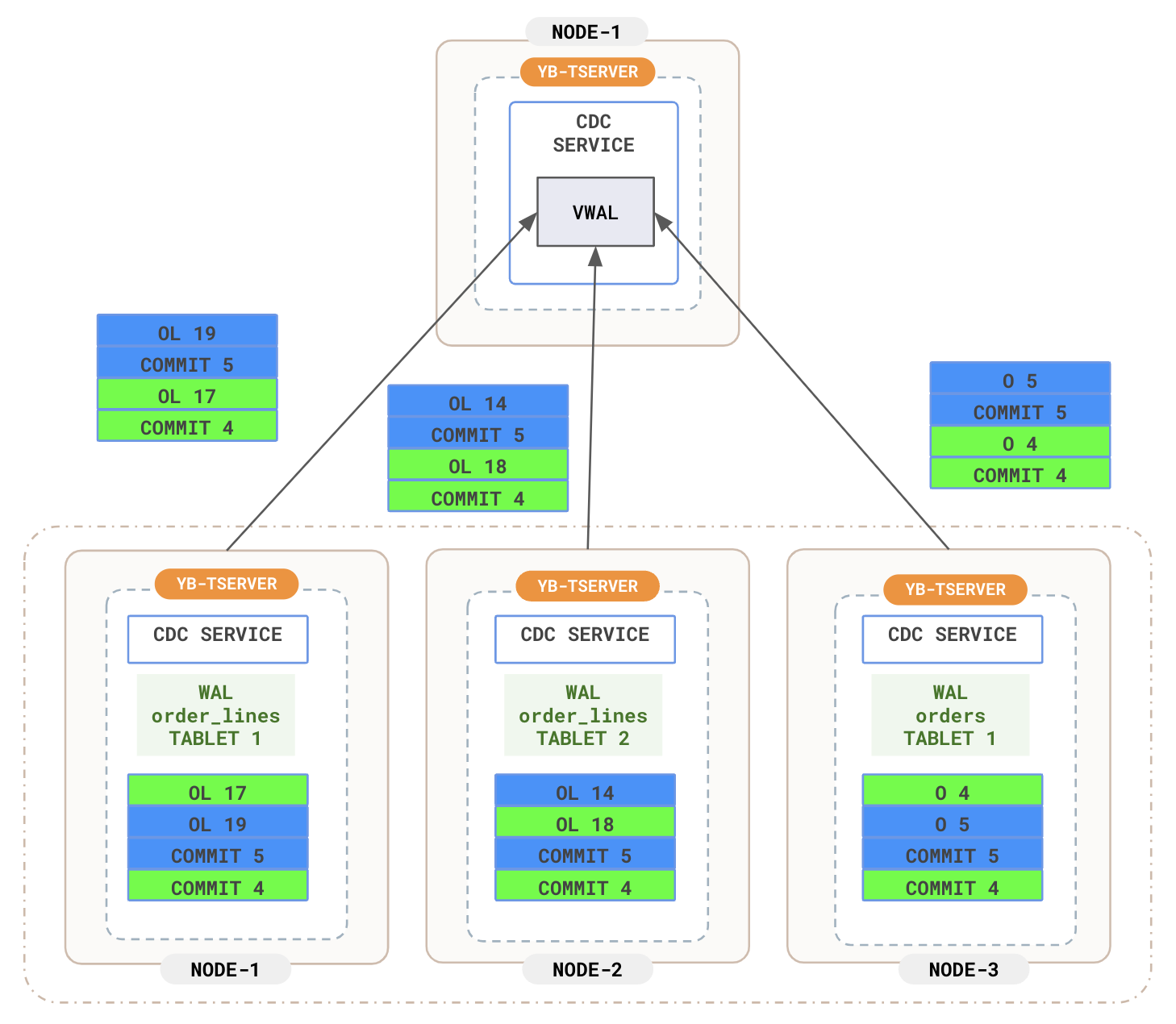
Each tablet sends changes in transaction commit time order. Further, in a transaction, the changes are in the order in which the operations were performed in the transaction.
**Step 2 - Sorting in the VWAL and sending transactions to the walsender**
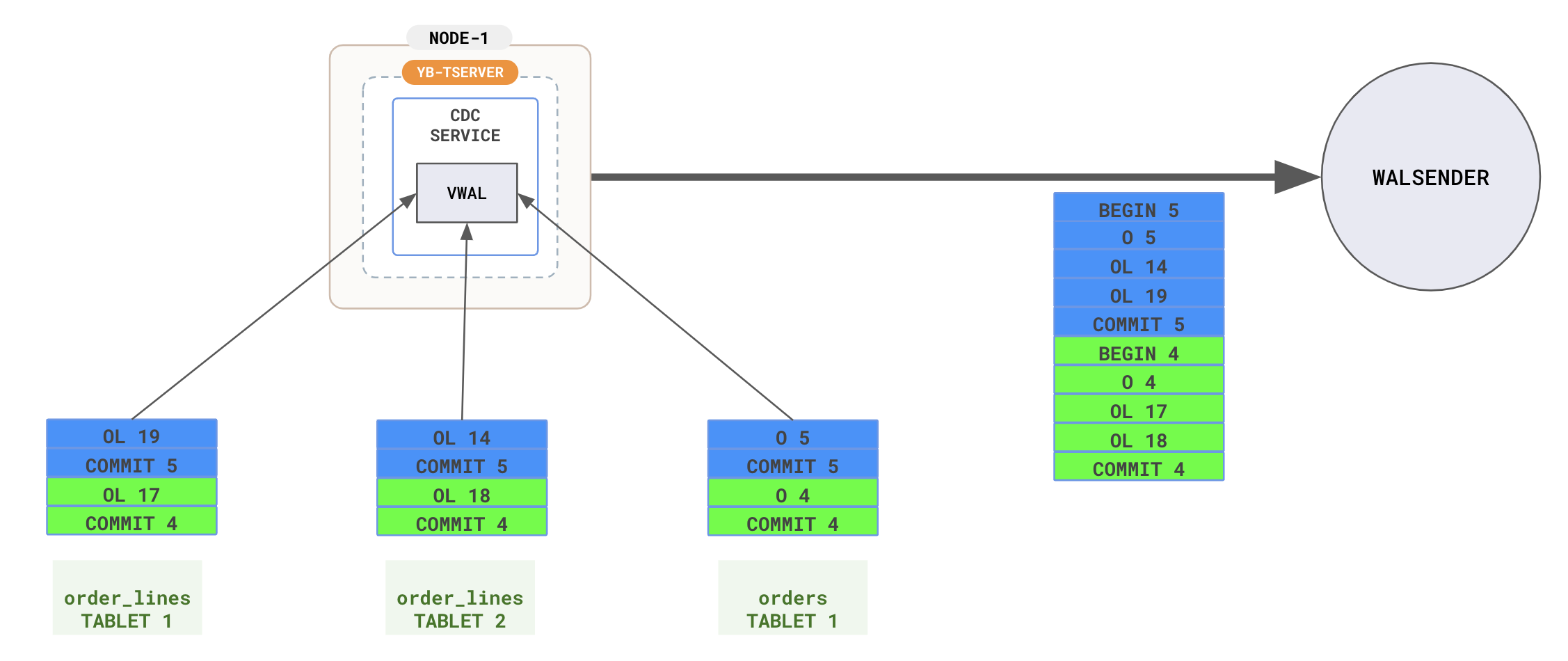
VWAL collects changes across multiple tablets, assembles the transactions, assigns a Log Sequence Number ([LSN](../../../additional-features/change-data-capture/using-logical-replication/key-concepts/#lsn-type)) to each change and transaction boundary (BEGIN, COMMIT) record, and sends the changes to the walsender in transaction commit time order.
**Step 3 - walsender to client**
The walsender sends changes to the output plugin, which filters them according to the slot's publication and converts them into the client's desired format. These changes are then streamed to the client using the appropriate streaming replication protocols determined by the output plugin. Yugabyte follows the same streaming replication protocols as defined in PostgreSQL.